Internet & Apps guide
Internet Access in Mainland China: What Travelers Should Prepare
A 2026 preparation guide for internet access in mainland China, covering roaming, SIM or eSIM planning, Wi-Fi, app verification, and legal offline backups.
Network availability, app access, roaming, SIM registration, and device compatibility can change. This guide covers lawful preparation and offline resilience only.
Quick answer
Choose roaming, SIM, or eSIM before travel, then save critical trip data offline.
Use this practical sequence to prepare, act, and recover if the normal plan does not work:
- Check whether your phone is unlocked and supports the bands or eSIM options you plan to use.
- Decide whether roaming, local SIM, eSIM, or a combination fits your arrival airport, trip length, and cost tolerance.
- Complete app logins and payment verification before departure whenever possible.
- Download offline booking confirmations, hotel addresses, phrase cards, and insurance documents.
Applies to travelers who need mobile data, maps, payment, and translation in mainland china, visitors deciding between roaming, sim, esim, airport wi-fi, or hotel wi-fi, travelers whose itinerary depends on app access.
Key facts
Check whether your phone is unlocked and supports the bands or eSIM options you plan to use.
Use pre-verified apps, email-based access where available, and hotel Wi-Fi while avoiding urgent checkout situations.
Use saved Chinese addresses, screenshots, and staff-facing phrase cards until the connection is stable.
Switch payment method instead of repeatedly changing networks.
Network preparation applies across mainland China.
Hotel Wi-Fi is an important fallback.
Step-by-step plan
- 01
Check whether your phone is unlocked and supports the bands or eSIM options you plan to use.
- 02
Decide whether roaming, local SIM, eSIM, or a combination fits your arrival airport, trip length, and cost tolerance.
Official visual reference
Use an official airport Wi-Fi fallback
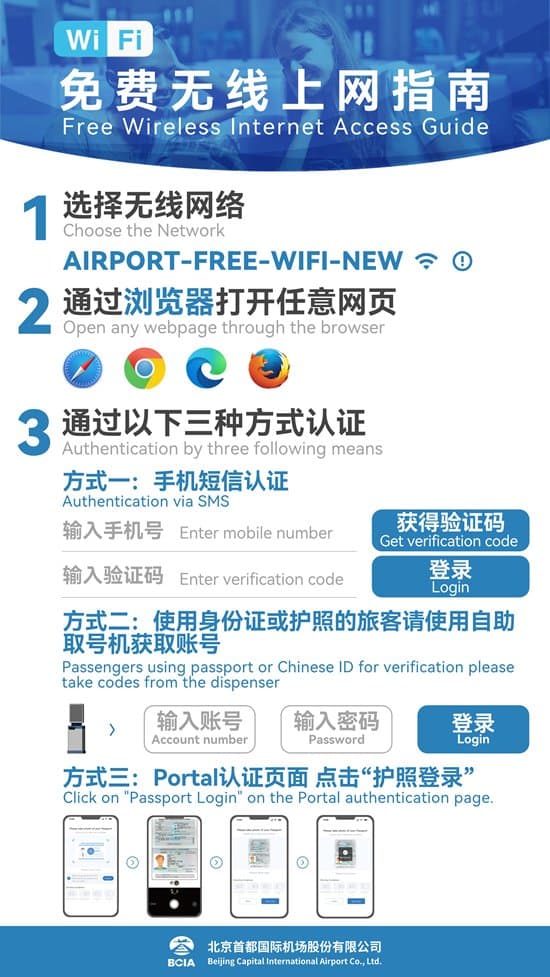
When mobile data is not ready, use the airport's stated network and an official SMS or passport-authentication path. Do not give a verification code to another person.
Beijing Municipal Government · airport Wi-Fi guideReviewed Jul 12, 2026
- 03
Complete app logins and payment verification before departure whenever possible.
- 04
Download offline booking confirmations, hotel addresses, phrase cards, and insurance documents.
- 05
Keep a paper or screenshot copy of the first hotel address and phone number in Chinese.
- 06
Use airport or hotel Wi-Fi only as a recovery path, not your only connectivity plan.
- 07
Avoid instructions or tools that violate local law, network rules, or platform terms.
When the normal plan fails
I cannot receive verification SMS in China.
Use pre-verified apps, email-based access where available, and hotel Wi-Fi while avoiding urgent checkout situations.
My map or translation app does not load.
Use saved Chinese addresses, screenshots, and staff-facing phrase cards until the connection is stable.
I bought data but payment still fails.
Switch payment method instead of repeatedly changing networks.
Practical details
Source cross-check
This answer was checked against State Council: A Guide to Working and Living in China as Business Expatriates 2025 and State Council: Payment service guide for overseas visitors to China. A third source, AMap Global on the Apple App Store, was used where the answer depends on implementation detail or traveler-facing handling. Where sources use different scope or dates, the guide follows the current official or most directly authoritative source and keeps platform or traveler-facing material as implementation context only.
Phrase cards
Wi-Fi login
English
Ask for the Wi-Fi name and password.
中文
您好,请问这里的无线网络名称和密码是什么?外国手机号可以登录吗?
Mobile data setup
English
Ask where to buy or activate mobile data.
中文
您好,请问附近哪里可以办理手机流量或电话卡?我需要上网导航。
Verification help
English
Ask for help when SMS or passport verification blocks internet access.
中文
您好,我收不到验证码。请问可以帮我确认手机号或护照验证是否填写正确吗?
FAQ
- Is airport Wi-Fi enough?
- No. It can help with recovery, but it is not reliable enough as your only payment, map, and translation connection.
- Should I set up payment before or after buying a SIM?
- Before departure is safer because account and card verification may require your home number or bank confirmation.
- What should be offline?
- Hotel addresses, booking IDs, passport scan, insurance, emergency contacts, phrase cards, and first-day route notes.
Sources and review
- State Council: A Guide to Working and Living in China as Business Expatriates 2025Official · checked Jun 28, 2026
- State Council: Payment service guide for overseas visitors to ChinaOfficial · checked Jun 28, 2026
- AMap Global on the Apple App StorePlatform · checked Jun 28, 2026
Visible guide facts must be supported by the page sources and rechecked before the next update date.
Plan the whole trip
Turn this answer into a China trip plan.
Peachspring Atlas turns practical guide decisions, timing, bookings, movement, and backup plans into a route you can actually use.